Basics
Why Your Verification Email Isn't Arriving — 9 Fixes That Actually Work
You type your email, press Sign up, and… nothing. You refresh. Still nothing. Verification emails are the one email you actually want, and they have a habit of going missing at exactly the wrong moment.
The good news: almost every missing verification email has one of a handful of causes. Below are nine fixes, in the order worth trying them. The first few take seconds. Fixes 6 to 9 are specifically for temporary email addresses.
1. Give it two full minutes
Most verification emails arrive within seconds. Some don't: the site may send emails in batches, or the receiving mail server may hold new senders for a quick spam check. Before you change anything, wait two minutes.
Don't press "Resend" five times while you wait. That creates several emails with several different codes, and usually only the last one works (see fix 4).
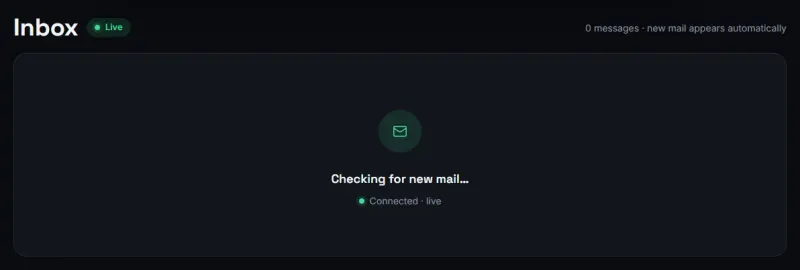
On tempmailkey you don't need to refresh. The inbox updates by itself, and the status line shows Connected · live while it is listening for new mail.
2. Check the address, letter by letter
A single wrong letter sends the email to someone else's inbox — or nowhere. This is the most common cause of all, and the easiest to miss. Look for:
- A typo in the name or the domain (gmial.com, outlok.com).
- A missing or extra dot, or a space at the start or end.
- Autofill entering an old address you no longer use.
Fix: copy and paste the address instead of typing it. On tempmailkey, press Copy next to your address and paste it into the form.
3. Look in spam, junk and other folders
In a regular inbox, verification emails often land in Spam/Junk, or in a tab such as Promotions or Updates. Search your whole mailbox for the site's name, not just the inbox.
Using a work or school address? Company mail systems often hold messages from unknown senders in a "quarantine" that you never see in your inbox. Your IT team can release it — or use a personal address for personal sign-ups.
Blocked the sender before? If you once marked this company's emails as spam or blocked them, new emails from them may be filtered too. Check your blocked senders list.
If you use Gmail, Google's help page on missing Gmail messages also covers less obvious causes: a filter that archives or deletes mail, forwarding to another address, or a full storage quota that makes new mail bounce.
4. Press "Resend" once — then use only the newest code
If two minutes have passed, use the site's Resend code or Send again button once. Then wait for the new email and use the code from that one.
Many sites cancel the old code when they send a new one. If you type the first code after requesting a second, you will see "invalid code" even though you typed it perfectly. Codes also expire, often after 10 to 15 minutes, so don't leave the tab open for an hour.
5. Make sure you're on the right step
Some sign-up problems aren't email problems at all:
- The site sent a text message, not an email. Some sites verify by phone instead, or ask you to choose.
- You already have an account. If you signed up before, the site may send a "you already have an account" email — or nothing — and expect you to log in instead.
- You closed the sign-up tab. Some flows need the original tab to stay open while you enter the code.
6. With temp mail: check the inbox is still open
Temporary inboxes don't last forever. Mail sent to an expired inbox is refused, so a site that sends its email late — or a second email hours later — may miss it. Here is what happens when a temporary email expires.
On tempmailkey, an inbox lasts 24 hours, and you can press Extend 24 h to keep it longer, up to 7 days. If you expect a follow-up email, extend the inbox and save your private link so you can open it again later.
7. With temp mail: switch domain
This is the fix that solves most temporary-email problems. Some websites block known temporary email domains to cut down on spam sign-ups. When a domain is blocked, the site either rejects your address with an error message or quietly never sends the email.
Blocks are usually per domain. tempmailkey has several, so:
- Press Switch domain in the address box. You get the same name on a different domain (or a new name, if that one is taken).
- Go back to the site and change your email to the new address (or start the sign-up again).
- Press Resend on the site.
Your first inbox stays open in a tab, so nothing is lost if the first email turns up after all.
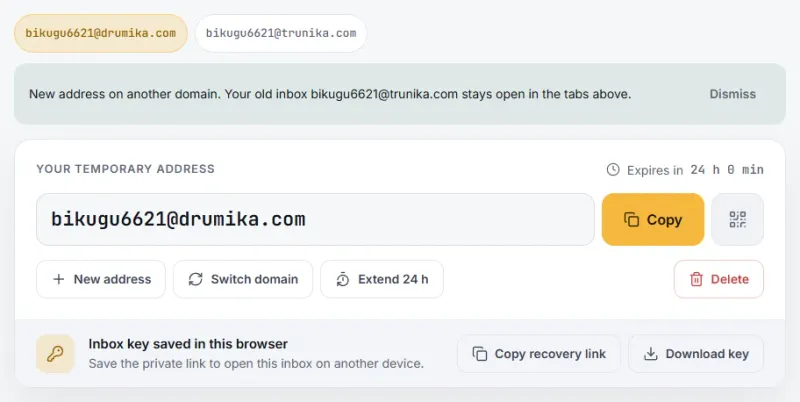
After Switch domain you keep both inboxes. The old one stays open in the tabs above the address.
8. With temp mail: check for a size or content problem
Very large emails can be refused by any mail server. tempmailkey accepts emails up to 10 MB, which covers virtually all verification emails. Note that attachments aren't stored — you see their names, but not the files — so a temporary inbox is the wrong choice if a site sends your sign-up details as a PDF you need to keep.
9. Accept that some sites need a real address
A few services refuse every disposable address, on purpose. Banks, payment apps and some large platforms do this to stop fake accounts, and that's their right. If none of the domains work:
- Use your real email, or a permanent alias that forwards to it. Our comparison of temp mail, aliases and the Gmail "+" trick explains which fits.
- Ask yourself whether you want this account long-term. If you do, a permanent address was the better choice anyway — see when you should never use a temporary email.
On tempmailkey, the Did you get what you needed? bar under each email has Worked and Didn't work buttons. Pressing them helps us see which domains a site accepts, so we can pick better ones.
Why do some sites block temporary email?
It helps to understand the other side. Sites that offer something free — a trial, a giveaway, a forum account — get flooded with fake sign-ups. One common defence is a list of known disposable email domains: if your address is on a listed domain, the form rejects it or the email is never sent.
That's why switching domain often works: a different domain may not be on the list a site uses. It's also why some sites refuse every disposable address: they've decided they need a long-term way to reach every user. Neither is a bug on your side or ours. When a site makes that choice, respect it and use a permanent address.
What you shouldn't do is look for tricks to get around a block on purpose — for example, to claim the same free trial again. Temp mail is for keeping your real inbox private, not for breaking a site's rules.
What not to do while you wait
- Don't sign up again and again with new addresses. Many sites slow down or block repeated sign-ups from the same device, which makes the problem worse.
- Don't type the code from an old email after requesting a new one.
- Don't click "verify" links from emails you didn't ask for. If a verification email arrives for a site you never visited, ignore it — it may be phishing.
Quick checklist
| Step | What to do | Time |
|---|---|---|
| 1 | Wait two minutes, don't spam Resend | 2 min |
| 2 | Copy and paste the address — no typing | 10 s |
| 3 | Search spam, junk and other folders | 30 s |
| 4 | Press Resend once, use the newest code only | 1 min |
| 5 | Check for a text message or an existing account | 30 s |
| 6 | Temp mail: make sure the inbox hasn't expired | 10 s |
| 7 | Temp mail: Switch domain, then Resend | 1 min |
| 8 | Large email or attachment? Use a real inbox | — |
| 9 | Still nothing? The site needs a permanent address | — |
Still stuck?
If you're using tempmailkey and the steps above didn't help, our shorter page Temp mail not receiving emails? has the same fixes in a quick format. If you think something is wrong on our side, write to support@tempmailkey.com and tell us the site (not your inbox link).